


Using laptop backpacks with digital password lock and an anti-theft pocket helps a lot, especially when you are traveling. It is safe guaranteed for protecting your valuable items inside, such as laptop, wallet, keys, passport, etc.
Enjoy the wonderful and worry-free trip with LOVEVOOK!
You may need a little bit help if you forget the combination. Luckily, we have attached a little notice card of lock instruction in the backpack, you may find it in the bag, please check it out and try.
And you may check more details from the listing which you ordered from too.

How to use the lock: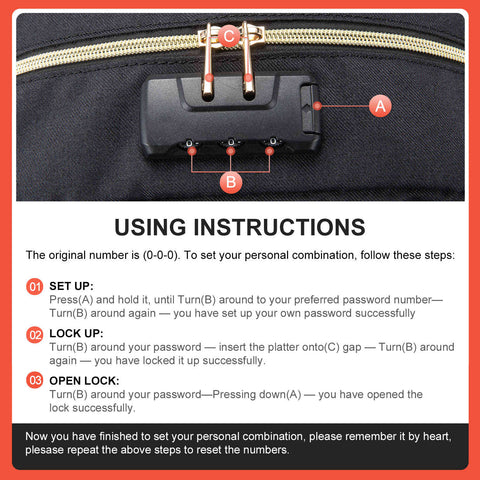
How to reset the code easily:
https://www.facebook.com/watch/?v=1053963158774362&ref=sharing
If there is still any problem, please don't hesitate to contact us via online inbox or email (support@lovevook.com), providing with your order id and problem, we would check and help.
Click to shop more LOVEVOOK bags with lock
LOVEVOOK Double Compartments Laptop Backpack
LOVEVOOK Anti-Theft Backpack for men
LOVEVOOK Insulated Lunch Bag
LOVEVOOK Duffle Bag
LOVEVOOK 2pcs Laptop Backpack, with Toiletry bag
47 comments
I just bought the laptop carry-on. The zipper poles do not go into the lock. Can someone help me please?
775-530-0096
How am I supposed to just “RESET” my backpack password? If I can do it, then theoretically, couldn’t ANYONE, like anyone that wants to learn how can come on this site and take the contents out of their roommate’s backpack and then change the lock? I tried 000, but no luck.
I forgot my passcode:( how do you reset the lock? Please help
I bought this bag and have been trying all how. Used videos and unable to set the lock
I can’t reset my combination lock on my lovevook bag. Please help! I’ve looked ar all the youtube videos, nothing works, very frustrating!!